

Blog
The Ultimate Guide to Programming Your HF Radio Like a Pro

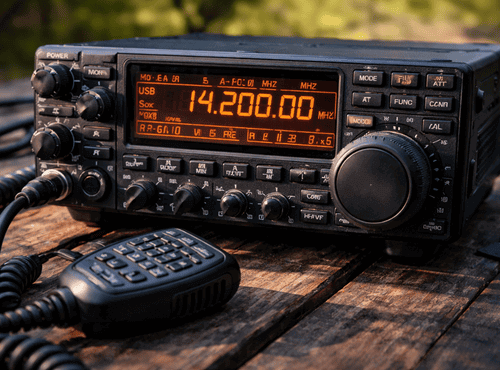
Programming an HF radio can feel intimidating at first glance. The menus appear technical, the terminology unfamiliar, and the number of options overwhelming. Yet once the basic principles are understood, configuring an HF set becomes a logical and rewarding process. Proper programming is the difference between a radio that simply turns on and one that performs with clarity across continents.
This guide walks through the essential steps and concepts that help operators program their HF radios confidently. Whether you are setting up for amateur use, emergency communication, or remote work, the same foundations apply.
Understanding What Programming Really Means
HF radio programming is more than entering a few frequencies. It involves creating channels, defining operating modes, setting power levels, and organising scanning lists. Each element shapes how the radio behaves on air.
Modern transceivers store this information in memory, allowing users to recall complex settings with a single button. The goal of programming is to build a structure that matches the way you communicate rather than relying on manual adjustments every time.
Gathering the Right Information First
Successful programming begins before touching the radio. Operators should collect the frequencies they intend to use, including any nets, emergency channels, or scheduled contacts. Note the required mode such as USB, LSB, or digital, and any specific bandwidth or power restrictions.
Having this list prepared prevents confusion later and ensures compliance with licensing conditions. Many beginners struggle simply because they start without a clear plan.
Learning the Menu Logic
Although brands differ, most HF radios follow similar menu logic. Channels contain frequency and mode. Groups organise channels. Scan lists determine which channels the radio checks automatically.
Spending time exploring the menu without pressure is worthwhile. Press buttons, read on-screen prompts, and consult the manual. Familiarity reduces mistakes when real programming begins.
Manual Entry vs Computer Software
HF sets can usually be programmed directly from the front panel or through dedicated software. Manual entry suits small setups with a handful of channels. Software becomes essential when dealing with large networks or multiple radios.
Programming software allows users to copy, paste, and save profiles. Entire configurations can be backed up or shared with other operators, saving hours of repetitive work.
Creating Clear Channel Names
A common mistake is leaving channels with numeric labels only. Meaningful names such as “Coast Net” or “Base USB” help operators select the right channel under stress. Good naming conventions improve safety and efficiency.
Keep names short but descriptive. Most radios limit characters, so consistency matters. Decide on a system and apply it across the entire memory bank.
Setting Modes Correctly
HF communication relies on choosing the correct mode. Voice typically uses USB or LSB depending on frequency band. Data modes may require narrower bandwidth and specific settings.
Incorrect mode selection is one of the most frequent causes of poor audio. Double-check each channel against official band plans to avoid frustration on air. The Australian Bureau of Meteorology notes that HF radio signals can travel long distances by reflecting off the ionosphere, which makes correct mode selection and frequency programming essential for reliable communication.
Power and Antenna Considerations
Programming also includes defining transmit power. More power is not always better. Using the minimum
level necessary reduces interference and saves battery life.
If the radio supports multiple antennas or tuners, assign the appropriate option to each channel. This ensures the system selects the best path automatically.
Building Scan Lists
Scanning allows the radio to monitor several channels for activity. Thoughtful scan lists ensure important frequencies are never missed. Group emergency channels together and keep casual contacts separate.
Avoid overloading scans with too many channels, which can slow response time. Quality scanning is about priorities rather than quantity.
Testing Before You Need It
After programming, real-world testing is essential. Make scheduled contacts, check audio reports, and confirm that scanning behaves as expected. Small errors discovered during testing are easy to fix.
Keep notes of what works well and adjust profiles gradually. Programming is an ongoing process rather than a single event.
Backups and Version Control
Once a reliable configuration is achieved, create backups immediately. Store copies on a computer and external drive. Label files with dates and radio serial numbers.
This habit protects against accidental resets and allows quick recovery if equipment must be replaced in the field.
Common Mistakes to Avoid
Beginners often mix channel spacing, forget to set the correct sideband, or overlook regional frequency rules. Another error is programming too many rarely used channels, which complicates operation.
Taking a slow, organised approach prevents most problems. If something behaves strangely, revisit the basics before assuming hardware faults.
Digital Modes and Advanced Features
Many modern HF radios support digital messaging, GPS tracking, or selective calling. These features require additional programming steps such as address books and encryption keys.
Read the manufacturer’s guidance carefully and introduce advanced options one at a time. Master voice communication first, then expand capabilities.
Working with Clubs and Networks
Amateur operators often participate in nets that publish standard channel lists. Importing these lists through software saves effort and ensures compatibility with other members.
Networking with experienced users is one of the fastest ways to improve skills. Most communities are happy to share proven templates.
Keeping Within Legal Boundaries
Programming must respect national licensing conditions and band plans. Transmitting on unauthorised frequencies can cause interference to critical services.
Always verify information from reliable sources and update profiles when regulations change. Responsible programming protects the reputation of the entire HF community.
Field Reprogramming Tips
When travelling, conditions may require quick changes. Learn how to edit at least basic settings from the front panel without a computer. Carry a printed list of key frequencies as backup.
Label cables and keep a small notebook with menu shortcuts. These simple habits make field adjustments far less stressful.
Growing from Beginner to Pro
Becoming proficient at HF programming is a journey. Start with a small, tidy configuration and expand gradually. Each new feature will make more sense as experience grows.
The satisfaction of hearing a distant station respond on a channel you programmed yourself is worth the effort. Skills gained today will support years of reliable communication.
Ready to Take Control of Your HF Radio
Programming is not a mysterious art reserved for technicians. With patience and the right guidance, any operator can configure their HF radio like a professional. The key is organisation, testing, and a willingness to learn.
For software, cables, and expert support to help you master your HF setup, visit Satellite World Store.
Frequently Asked Questions
1. What does programming an HF radio involve?
Programming an HF radio involves more than entering frequencies. It includes creating channels, selecting operating modes such as USB or LSB, setting transmit power levels, organising scan lists, and configuring advanced features where available.
2. Is it better to program an HF radio manually or with software?
Manual programming is suitable for small setups with only a few channels. However, programming software is recommended for larger configurations, multiple radios, or when backups and profile sharing are required.
3. Why is correct mode selection important in HF programming?
Choosing the correct mode ensures clear communication and proper signal transmission. Using the wrong sideband or bandwidth can result in distorted audio or failed contacts, especially over long distances.
4. How do scan lists improve HF radio operation?
Scan lists allow the radio to automatically monitor selected channels for activity. Properly organised scan lists help operators prioritise emergency or operational frequencies without constantly switching channels manually.
5. Should I back up my HF radio configuration?
Yes. Creating backups of your programmed settings protects against accidental resets, hardware replacement, or field damage. Keeping dated configuration files ensures quick recovery and consistent operation.