

Blog
3 Software Tools Every HF User Needs Right Now
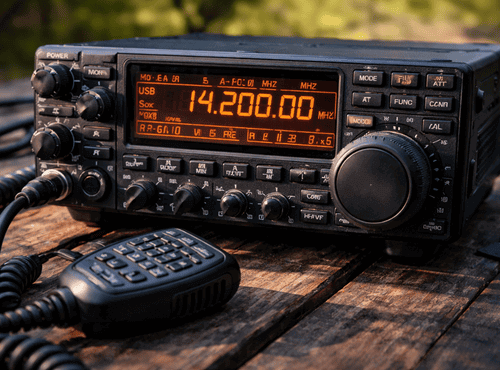
HF radio hardware often receives all the attention, yet the real power of a modern station lies in its software. The right applications turn a basic transceiver into a smart communications hub capable of messaging, remote control, and efficient programming. For field users and technicians, software is no longer optional; it is the key to getting the best performance from existing equipment.
Many operators still rely on front-panel programming and manual logging, methods that worked well in the past but struggle to meet today’s demands. Missions now require rapid deployment, accurate data exchange, and easy maintenance across multiple radios. Three categories of software have become essential for achieving those goals.
Why Software Matters More Than Ever
HF communication has evolved beyond simple voice conversations. Modern networks combine email gateways, GPS tracking, digital modes, and selective calling. Managing these features without software quickly becomes impractical.
Software reduces human error, speeds up configuration, and creates repeatable setups. A technician can clone dozens of radios with identical profiles in minutes rather than hours. Field teams benefit from consistent channels and predictable behaviour across their fleet.
Tool One: Programming and Configuration Suites
The first must-have category is dedicated programming software supplied by radio manufacturers or trusted developers. These suites allow users to create channel lists, set modes, adjust power levels, and manage security features from a computer.
Instead of navigating complex menus on a small screen, technicians work within clear tables and forms. Frequencies can be copied from spreadsheets, and entire configurations saved as templates. When a new radio arrives, loading the template produces an instant, mission-ready unit.
Programming suites also provide firmware updates. Keeping radios on the latest version improves stability and unlocks new features. For organisations operating dozens of sets, this centralised control is invaluable.
Practical Benefits in the Field
Field technicians often need to modify channels as projects move locations. With software, they can connect a laptop, make changes in seconds, and redeploy the radio immediately. There is no need to memorise button sequences or worry about accidental resets.
Backups created by the software protect against equipment failure. If a unit is damaged, its replacement can be configured identically using the saved file, ensuring continuity of communication.
Tool Two: Digital Mode Applications
The second essential group includes digital mode programs that handle text, email, and data over HF. Applications such as Winlink clients, sound-card modems, and ALE controllers transform the radio into a versatile data terminal.
Voice alone is often insufficient for modern operations. Teams need to send situation reports, medical requests, or coordinates with accuracy. Digital modes deliver this information even when signals are weak or noisy. According to the Australian Bureau of Meteorology, HF radio can provide reliable long-distance communication 24 hours a day using ionospheric transmission, making it essential for remote and emergency operations.
Bridging the Gap Between HF and the Internet
Digital software frequently connects HF networks to internet services. Messages can be composed offline and forwarded through gateways to regular email addresses. This bridge is crucial during disasters when conventional networks collapse.
Technicians appreciate the ability to log traffic automatically and store messages for auditing. The software becomes both a communications tool and a record-keeping system.
Tool Three: Logging and Remote Control Platforms
The third category covers logging and remote control applications. Logging software tracks contacts, signal reports, and time stamps, creating a professional record of activity. Remote control tools allow operators to manage radios from another room or even another country.
For organisations with base stations in remote areas, remote control reduces travel costs. Engineers can diagnose problems, change frequencies, or start scanning without visiting the site.
Efficiency Through Automation
Automated logging saves countless hours. Instead of handwritten notebooks, every transmission is captured with precise details. Reports can be generated for compliance or performance analysis.
Remote platforms also support shared use. Several operators can access the same radio at different times, maximising expensive equipment.
Choosing the Right Combination
Not every user requires every feature. Amateur enthusiasts might focus on digital messaging, while commercial teams prioritise configuration control. The best approach is to identify daily tasks and select software that simplifies them.
Compatibility with your specific radio model is critical. Always confirm supported operating systems and connection cables before purchasing. Reliable suppliers can recommend packages proven to work together.
Security Considerations
Software introduces new security responsibilities. Configuration files may contain frequencies, call signs, or encryption settings that should be protected. Use strong passwords and restrict access to authorised staff only.
Regular updates close vulnerabilities and improve performance. Treat radio software with the same care as any corporate application.
Training the Team
Even intuitive programs require basic training. Short workshops help operators understand file management, backups, and common troubleshooting steps. Investing time early prevents costly mistakes later.
Create simple guides tailored to your organisation’s procedures. Clear documentation ensures that knowledge survives staff changes.
Integrating with Existing Equipment
One advantage of software is its ability to breathe new life into older radios. Many legacy models can connect to modern applications through interface boxes or sound cards. This approach stretches budgets while expanding capability.
Technicians should evaluate whether upgrades can achieve required functions before replacing hardware entirely.
Real-World Examples
A mining company in a remote region used programming software to standardise channels across fifty vehicles, eliminating confusion between shifts. An emergency response team adopted digital messaging to send medical data from disaster zones where satellites failed. A research station relies on remote control to operate its HF base from a city office.
These scenarios demonstrate how software turns radios into integrated communication systems rather than isolated devices.
Avoiding Common Pitfalls
The most frequent problems arise from outdated drivers, incorrect COM port settings, or mismatched audio levels. Keeping a checklist of installation steps saves frustration.
Another pitfall is using unofficial downloads that may contain malware. Always obtain software from reputable sources and verify file integrity.
The Future of HF Software
Developers continue to add features such as automatic link establishment, advanced encryption, and smartphone integration. The boundary between HF and other networks is fading, making software knowledge as important as antenna theory.
Operators who embrace these tools will enjoy clearer communication and greater flexibility than those relying solely on traditional methods.
Getting Started Today
Begin by identifying one task that consumes too much time, such as channel entry or message handling. Choose software that addresses that need and learn it thoroughly before expanding to others. Progress step by step rather than installing everything at once.
The transformation is remarkable. Radios become easier to manage, teams communicate more effectively, and technicians gain confidence in their systems.
For genuine cables, recommended applications, and expert advice on the best software for your equipment, visit Satellite World Store.
Frequently Asked Questions
1. Why is software important for modern HF radio stations?
Software allows operators to program channels faster, reduce human error, manage digital messaging, update firmware, and maintain consistent configurations across multiple radios. It transforms a basic transceiver into a complete communications system.
2. What is HF radio programming software used for?
Programming software is used to create and edit channel lists, adjust power levels, configure modes, manage security settings, and update firmware. It enables technicians to clone configurations across multiple radios quickly and accurately.
3. What digital mode software works with HF radios?
Digital mode software includes Winlink clients, sound-card modem programs, and ALE controllers. These applications allow users to send email, text, GPS data, and structured reports over HF, even when signals are weak.
4. Can HF radios be remotely controlled using software?
Yes. Remote control software allows operators to manage radios from another location. Users can change frequencies, monitor activity, start scanning, and diagnose issues without physically accessing the equipment.
5. Is HF radio software secure?
HF radio software can be secure when properly managed. Configuration files should be protected, access should be restricted to authorised users, and software should always be downloaded from trusted sources. Regular updates help prevent vulnerabilities.

